Webhook Setup
Plakar Control Plane can send event notifications to an external HTTP endpoint using webhooks. Webhooks are configured per organization, from the organization settings.
Enable the Enabled switch to activate webhook delivery. When disabled, Plakar Control Plane does not send any webhook requests.
Specify the Target URL that should receive webhook requests. This endpoint must be reachable from the Plakar Control Plane instance.
You can optionally secure webhook requests using one of the available authentication methods:
- None: Requests are sent without authentication.
- Shared Key: Provide a secret that is included in the
Authorizationheader of every webhook request. - HMAC (SHA256): Provide a secret that Plakar Control Plane uses to sign the
request body. The generated signature is included in the
X-Plakman-Signatureheader using the formatsha256=..., allowing the receiving service to verify the request integrity and authenticity.
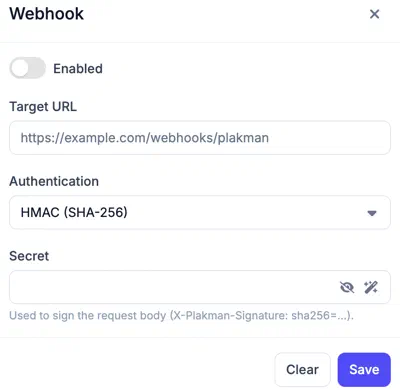
Once enabled, all supported webhook events are delivered to the configured endpoint using the selected authentication method.