

When we started building the Plakar UI you see when running plakar ui or
visiting https://demo.plakar.io, we had only one
GitHub repository containing a single React app. Life was simple.
Then, we started working on Plakar Control Plane, the enterprise version of Plakar, that needs its own UI. It has different pages, different workflows, but it shares a lot with the OSS version: the same design system, the same dependencies, the same API client patterns.
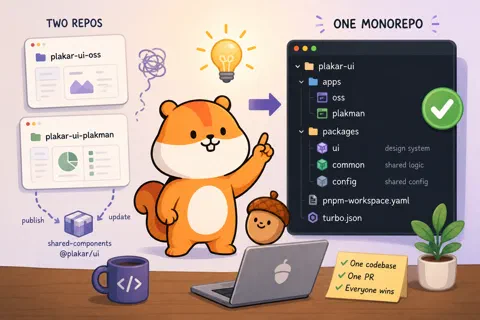
We had to make a choice: should we have two different repositories, one for the OSS UI and one for the Control Plane UI, then extract shared components into other repositories? Or should we keep everything in one repository?
You guessed it from the title: we went with the monorepo approach, using
turborepo and pnpm.
The problem with two repos
Picture the alternative for a second. Two repos, plakar-ui-oss and
plakar-ui-plakman. Shared components extracted into a third repo, published as
an npm package. Every time we fix a bug in a button or improve a form component,
we push to the shared package, bump the version, publish, then update the
version in both apps and open two more PRs.
Every keyboard navigation fix: three repos involved. Every design tweak: a version bump and two dependency updates. Every breaking change: a coordination exercise.
We’ve seen that movie. It’s not fun.
So: one repo.
plakar-ui/
├── apps/
│   ├── oss/          # UI for the open-source Plakar
│   └── plakman/      # UI for the Plakar Control Plane
├── packages/
│   ├── ui/           # Pure presentational component library (~50+ components)
│   ├── common/       # Shared business logic, API clients, domain components
│   └── config/       # Shared ESLint and TypeScript configurations
├── package.json
├── pnpm-workspace.yaml
└── turbo.json
packages/ui is our design system: buttons, inputs, modals, badges, tables —
all the atomic building blocks, with no knowledge of Plakar’s business logic.
packages/common is where the Plakar-specific shared logic lives: API clients,
domain-specific components (like a “repository list” component), and shared
hooks.
packages/config holds shared ESLint and TypeScript configurations. Without it,
every package drifts toward its own slightly different setup.
Improve a component in packages/ui, both apps get it immediately. Fix a bug in
packages/common, both apps get the fix. One PR, done.
pnpm: why not just use npm?
JavaScript ships with npm built in. It’s the default, it works, and most tutorials use it. So why switch?
Phantom dependencies — the main reason. npm flattens all nested dependencies
into a single top-level node_modules folder. The side effect: your code can
accidentally import a package you never declared as a dependency, because some
other package happens to depend on it.
It seems harmless until it isn’t. Imagine you import lodash somewhere and it
works fine. Months later, the package that was quietly pulling in lodash
removes it in a patch update. Your build breaks, but nothing in your
package.json changed. You spend an hour figuring out why.
In a monorepo this gets worse: packages can silently depend on things declared only in a sibling package, so the breakage only shows up in certain build orders or environments.
pnpm’s node_modules structure is strict: you can only import what you’ve
explicitly declared in your own package.json. Phantom dependencies become a
compile error, not a runtime mystery.
Speed. pnpm uses a content-addressable store — packages are stored once on disk and referenced by hard links. Installs are faster. To be perfectly honest, that’s not the main reason we switched, but it’s a nice bonus.
Security. pnpm ships with supply-chain security features that npm lacks out
of the box. Our pnpm-workspace.yaml configures several of them:
trustPolicy: no-downgrade— install scripts can only run for packages explicitly approved, and approvals can’t be silently downgraded by a dependency updateblockExoticSubdeps: true— blocks dependencies from GitHub URLs, git refs, and other exotic registries that bypass normal vettingminimumReleaseAge: 10080— packages must be at least 7 days old before installation, giving the community time to catch malicious publishes
These are opt-in in pnpm. They don’t exist in npm at all.
The lockfile. pnpm’s lockfile (pnpm-lock.yaml) records the full dependency
graph, not just the flattened result. More reliable, easier to reason about.
Telling pnpm which directories are workspace packages is two lines:
packages:
  - "apps/*"
  - "packages/*"
That’s it. When apps/oss lists @plakar-ui/ui as a dependency, pnpm links it
directly to packages/ui instead of downloading from a registry.
Turborepo: the part that keeps you sane
Here’s the problem a monorepo introduces: packages depend on each other, and you
need to build them in the right order. Before you can build apps/oss, you need
to build packages/ui and packages/common. Before CI can pass, you need to
lint and type-check everything, in order, without re-running things that haven’t
changed.
Doing this by hand is immediately tedious. A naive pnpm -r run build runs
builds sequentially with no dependency ordering and no caching.
Turborepo solves this. You describe your tasks in turbo.json, it figures out
the dependency graph, runs what it can in parallel, and caches everything.
{
  "tasks": {
    "build": {
      "dependsOn": ["^test", "^check-ts", "^lint"],
      "outputs": ["dist/**"]
    },
    "test": {},
    "lint": {},
    "check-ts": {},
    "dev": {
      "cache": false,
      "persistent": true
    }
  }
}
The ^ prefix is the key. "dependsOn": ["^build"] means “run build in all
my dependencies before running build here”. turbo build across the whole
monorepo just works, in the right order, automatically.
The caching is where you really feel it. Turborepo hashes the inputs to each
task — source files, dependencies, environment variables — and stores the
output. If nothing changed, it replays the result from cache instead of running
again. Change one file in apps/oss, and only apps/oss gets re-checked.
Everything else is instant.
The first time you run pnpm check after a small change and watch most of it
come back green from cache in under a second, you get why this exists.
The dev task has "cache": false because dev servers are long-running
processes, not one-shot tasks with outputs to cache.
What this looks like day to day
pnpm run dev starts both app dev servers in parallel. Both resolve their local
packages directly from packages/ via workspace links. Change something in
packages/ui and both running apps update immediately — no publish step, no
version bump, no waiting.
pnpm run check runs lint, TypeScript checking, and tests across everything.
Turborepo handles the ordering, runs the apps in parallel once the packages
pass, and skips anything that hasn’t changed. On a typical PR that touches one
file, most of it is cached and the whole thing finishes in seconds.
That’s the foundation. Next up: React — not a crash course, but an explanation of why the component model exists and what it’s actually solving.