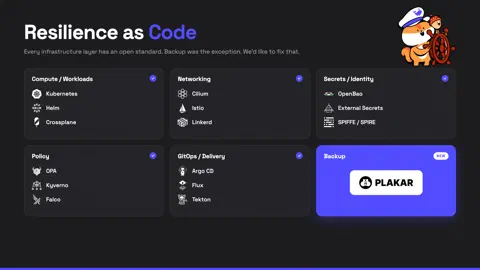


Platform teams run their clusters, networking, secrets and policies as code. All of it is declared in Git, reviewed in pull requests, and often reconciled into Kubernetes by a controller. This practice is called infrastructure as code, and is increasingly popular in the cloud-native ecosystem.
Backup is the exception. For most engineering teams it is still done manually in a complex UI console, unversioned and managed in silos. And because it is manual, it drifts. Your data surface keeps growing on its own: a team ships a service with a new PersistentVolumeClaim, someone stands up a database in a namespace the backup admin has never heard of. The configuration in the console does not know any of it exists, so it silently falls behind. That makes your backups impossible to reconstruct from source, hard to audit and slow to operate.
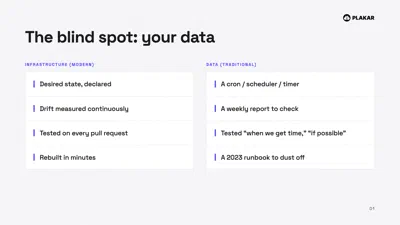
GitOps already solved this for the rest of your infrastructure. There is no good reason to leave data protection out. What made infrastructure as code popular was never the YAML, it was the loop behind it: a controller that continuously reconciles reality against the declared state, notices drift and corrects it.
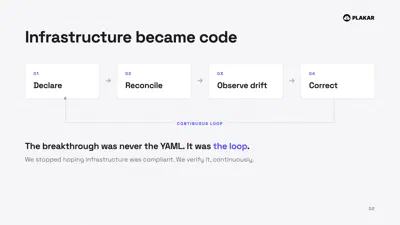
Backup should be driven by the same loop. That’s why we believe resilience as code is the future of backup. A future where backup is no longer a separate process, it is driven from the tools that run your platform.
Where are you on the resilience maturity curve?
That’s a question we often ask our users. The responses we get vary quite a bit in terms of level of encryption, immutability, restorability, number of copies and operational automations.
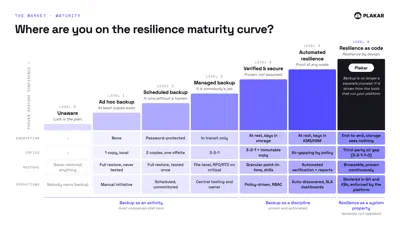
With Resilience as Code, backup is no longer a separate process added on top of your platform. It is a property of the system from the start:
- Declared, not operated. What you protect, and how, lives in Git and Kubernetes, versioned and reviewed like any other config, and the platform keeps it true. Nobody clicks through a console, and nobody has to remember to protect the new service.
- Encrypted end to end, so the storage sees nothing. Keys stay under your control, and your hosting provider cannot read your data.
- Proven continuously. Recovery is not a test you run once and hope it still works when you need it. Snapshots are verified on an ongoing basis, and you can browse into one and pull back exactly what you need.
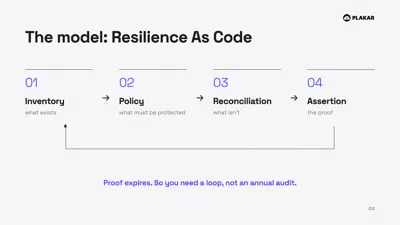
A few months back, we took a first step in that direction by introducing a Kubernetes integration. Today, we’re taking another step towards making that vision a reality by introducing the Plakar Kubernetes Operator. It exposes the entire Plakar Control Plane as Kubernetes Custom Resources and keeps them continuously reconciled, so you declare resilience for everything you run in the same way you already manage your infrastructure.
Declare it, and let the operator reconcile it
The Plakar Kubernetes Operator introduces a small set of Custom Resource kinds that map to how you actually think about resilience:
Source: what to protect.Store: where snapshots land.Destination: where a restore goes.ScheduleBackup,ScheduleSync,ScheduleCheck: recurring backups, replication, and integrity checks.Restore: recover on demand.
Each kind maps one to one onto a Control Plane resource, and the operator keeps
them in sync. Take a real example, a WordPress deployment with its MariaDB
database. That is two things worth protecting: the uploads on a PVC and the
database behind it. As code, they are two Source objects in the same
directory:
apiVersion: connector.plakar.io/v1alpha1
kind: Source
metadata:
  name: wordpress-pvc
spec:
  endpoint: /wordpress/data-pvc
  protocol: k8s+csi
  integration:
    name: k8s
    version: v1.1.7
  environment: production
  fieldsFrom:
    secretKeyRef:
      name: kubeconfig
  fields:
    volume_snapshot_class:
      value: my-snapclass
Three details matter here. protocol: k8s+csi reads the volume straight through
the CSI snapshot interface, so you get a consistent point-in-time copy even
while WordPress is writing to it. integration.version is pinned, so a backup
taken today and a restore run in six months behave identically. And sensitive
values come fieldsFrom a Secret, so the manifest is safe to commit and review
in the open.
Add a Store and a ScheduleBackup, and that is the entire backup policy for
the app: four files, in Git, reviewed together.
Reconciliation, not a cron job
The point is not that you can apply a YAML file. It is that the operator runs a
control loop. Your desired state lives in Git. Argo CD or Flux syncs it into the
cluster. The operator watches those resources and continuously drives the
Control Plane toward the declared state, then reports back. Each resource
exposes its Control Plane identity through status.id and its health through
standard conditions (Available, Progressing, Degraded), so kubectl get
and kubectl describe work exactly as you expect.
That means a degraded backup is not a surprise you find during an incident. It is a condition on an object, alerting the same way a failing Deployment does.
Recovery is the part that actually matters. With snapshots stored as a structure you can browse, you can restore a single path or a single resource instead of rehydrating an entire volume to get one file back.
It does not stop at the cluster edge
Here is the design decision we are most convinced by: a Source does not have
to be a PVC. A Source can be a database, a SaaS application, a filesystem, or
an object store, so the same declarative model governs protection for everything
you run from the place your platform team already works.
Unlike Velero which protects what runs inside the cluster, Plakar lets your cluster protect everything else too, under one control plane, declared the same way.
Terraform and Ansible, too
The Kubernetes Operator is not the only way to declare resilience as code.
Plakar also ships
Terraform and
Ansible providers that
configure the Plakar Control Plane from code. Stores, connectors, schedules,
inventories, organizations and the roles held within them are declared in .tf
or Ansible files and reconciled with terraform apply (or its Ansible
equivalent), instead of being created by hand in the web interface.
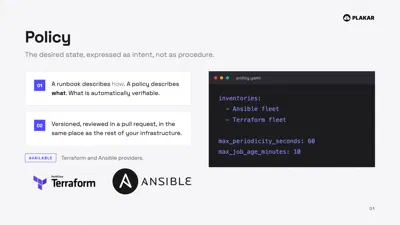
Under the hood, both providers call the Control Plane API to create, update and read those objects. Plakar still performs every backup, restore, sync and check itself, so you version and review your resilience like the rest of your infrastructure, whichever front-end your platform team prefers.
Getting Started
You can learn more about Plakar Kubernetes Operator in our documentation.
The Free plan is the easiest way to discover and get started with the Plakar Control Plane. It supports up to 500GB of managed data, making it well suited for small configurations, personal use, or evaluating the platform before committing to a larger deployment. Select your provider here to get started with the installation.