


TL;DR:
Our OpenStack integration, which first shipped in Plakar Control Plane, is now free for everyone in Plakar Community (OSS). It backs up and restores Cinder volumes and Nova servers through the OpenStack APIs only, with no agent to install. Backups are encrypted, deduplicated and stored outside the cloud, on any OpenStack cloud, OVHcloud Public Cloud included.
Why we built an OpenStack integration, and why we are making it free
We built this integration first and foremost because a large part of Europe’s independent cloud runs on OpenStack: OVHcloud, Open Telekom Cloud, Cleura, Exoscale, etc. In the US the picture is different. AWS, Azure and Google Cloud run their own stacks, but OpenStack is still common inside the private clouds of large companies, in the telco and higher education sectors for instance. Wherever it runs, it holds data that needs a real backup. The good news is that OpenStack offers truly open APIs, so you can move from one provider to another.
If you are reading this post, you might be asking yourself: OpenStack already has snapshots, why do I need more? A Cinder snapshot is fast and cheap, but it lives in the same Cinder backend as the volume it protects. If that backend is lost, wiped or encrypted by an attacker, the snapshot goes with it. The way we see it, a backup should be offsite, and you have to hold the keys.
That is also why we are making it free. The integration was first shipped in Plakar Control Plane; today it is available to everyone in Plakar Community (OSS). If strategic autonomy is why you chose OpenStack, you should be able to back it up without asking anyone.
How Plakar backs up OpenStack volumes
Here is the thing about OpenStack: no API reads a snapshot’s bytes. The only service that will hand you a disk is Glance, the image service. So every backup takes a detour. (Yes, that is where the title comes from.)
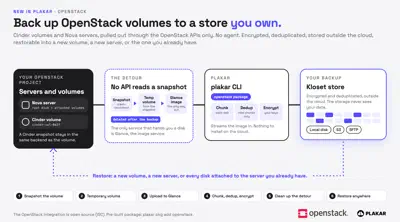
A volume backup in four steps
- Plakar snapshots the volume. If the volume is in use, the copy is crash-consistent: what you would get after pulling the power cord.
- It creates a temporary volume from the snapshot and uploads it to Glance as an image.
- It streams the image into Plakar, which chunks it, keeps only the chunks it has never seen, then compresses and encrypts them into a Kloset store.
- It deletes the image, the temporary volume and the snapshot. Cinder is not always ready to delete right away, so Plakar waits up to 15 minutes for each one.
Servers, restores and limits
A Nova server is the same path, once per disk, plus its flavor and networks. Restore goes the other way: into a new volume, into a new server (in another project or region if you want), or onto the server you already have.
Getting started
So, to sum up: Plakar talks to the OpenStack APIs (Keystone, Cinder, Nova and Glance) with an application credential, so nothing is installed in your cloud or in your guests. It works on any OpenStack cloud; on OVHcloud Public Cloud, you create the application credential in the Horizon dashboard and you are done. And the OpenStack integration is now free for everyone in Plakar Community (OSS).
Download Plakar, then install the package (pre-built packages need a free Plakar account):
$ plakar login
$ plakar pkg add openstack
Back up a volume, then restore it into a new one:
$ plakar source add myvol openstack-block://<volume-id> \
    openstack_auth_url=https://keystone.example.com:5000/v3 \
    openstack_application_credential_id=<id> \
    openstack_application_credential_secret=<secret> \
    openstack_region=RegionOne
$ plakar backup @myvol
$ plakar destination add myvoldst openstack-block://spawn <same options>
$ plakar restore -to @myvoldst <snapshot-id>
For a server, use openstack-instance://<server-id> instead. The rights each
connector needs are in the
OpenStack docs.
Happy hacking!