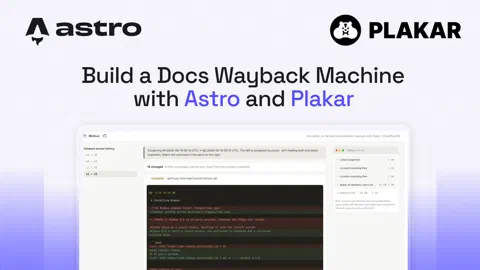


What if you could open your documentation as it stood on any past date, not just today’s page or an old commit’s raw markdown? When a customer on a previous release follows your install guide, or support reproduces their ticket, both need the steps, screenshots, and default config exactly as they were in that version. Yes, you can find those by hand, reading the old markdown on GitHub and then browsing to each image and PDF it references at that commit, but it is slow manual work for something you only need once in a while, on-demand.
This is where Plakar comes in. It can snapshot the whole docs site, its pages,
images, PDFs, and stylesheet, into an encrypted, content-addressed, immutable
Kloset store
where every snapshot is fully restorable on-demand. This guide builds “Nimbus
Docs”, an Astro application that serves any past version back at an archive URL
(/archive/2026-03-01/getting-started, for example).
You will use Plakar for the snapshots, an Astro server application for the retrieval, and Cloudflare R2 to keep the encrypted store offsite.
Demo
Try it at astro-plakar-wayback.fly.dev.
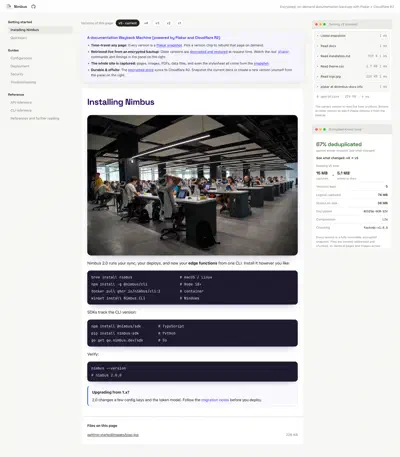
v5 is the live version, read from src/docs on disk. The panel on the right
shows the breakdown of the plakar commands it ran to load the version, and the
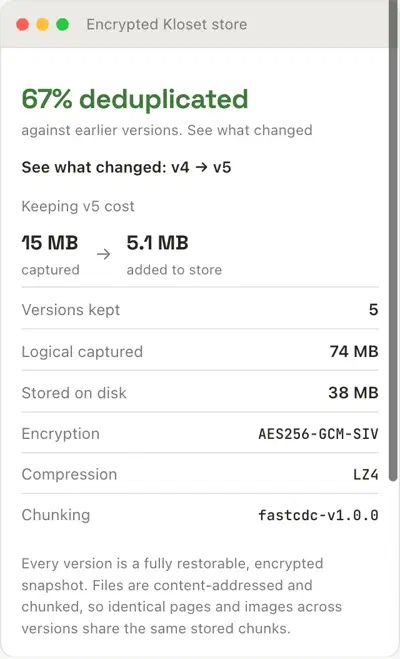
store card below it shows how much size the version added after deduplication.
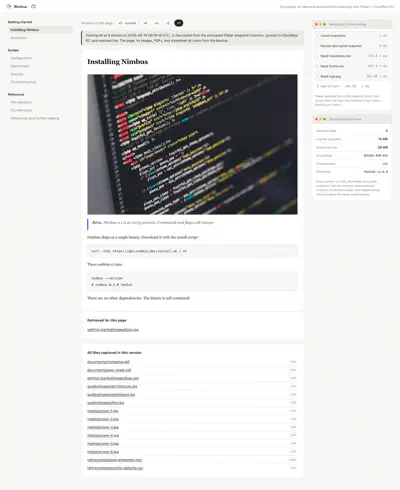
Opening v1 retrieves that snapshot from the encrypted backup. The page, its version-correct screenshot, its PDFs, and its stylesheet all come out of the same snapshot.
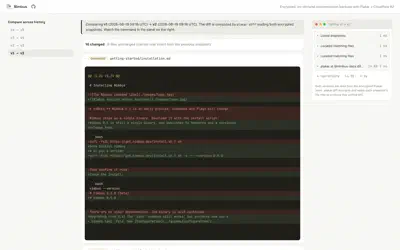
plakar diff reads both encrypted snapshots and returns a unified diff for
text, marks binaries as changed, and leaves unchanged files sharing their stored
chunks.
The store card compares the logical size against the real on-disk footprint, reports the deduplication ratio between versions, and names the encryption, compression, and chunking in use.
Prerequisites
- Node.js 22 or newer
plakar1.1.0 or newer on the machine. The app runsplakaras a subprocess, so the binary has to be on yourPATH.- (Optional) A Cloudflare R2 bucket and API token, only if you want the archive kept offsite.
Create the Astro application
Since there’s lot to cover in this application, the easier way is to clone the project, install its dependencies and then learn the core parts around plakar powered snapshots, offsite backups, and encryption.
Run the following commands to clone and install the project:
# Clone the project
git clone https://github.com/rishi-raj-jain/astro-plakar-wayback
cd astro-plakar-wayback

# Install the dependencies
npm install
cp .env.example .env
It installs the following important dependencies:
astrowith@astrojs/node: the Astro framework and its Node.js adapter, so that pages can run on a live server that can shell out toplakar.@astrojs/sveltewithsvelte: to power the interactive islands, such as the live retrieval panel and the version action buttons.marked: to render each page’s markdown to HTML.gray-matter: to parse the front matter (title, section) at the top of every markdown page.aws4fetch: to sign the S3-compatible requests that push and pull the store tarball on Cloudflare R2.
The Astro application is server-rendered
Since retrieving an old version runs plakar on the fly and the action
buttons execute real-time backups, the application needs a Node.js runtime
with the plakar binary installed.
Understand the Kloset store
The store is
Plakar’s immutable, content-addressed engine.
It splits every file into encrypted chunks, addresses each chunk by a hash of
its contents so an identical chunk is stored once, and never rewrites a chunk
after it is written. You can read the store’s own properties with
plakar info, which
the application surfaces in a panel in the right sidebar: the data is
encrypted
with AES256-GCM-SIV,
compressed
with LZ4, and split with the
FastCDC content-defined chunker.
Point Plakar at the Kloset store
The application talks to a single Kloset store referenced as @nimbus-docs.
Encryption is a property of that store, set by a passphrase when the store is
created and supplied to every command through the PLAKAR_PASSPHRASE
environment variable in your .env. A new passphrase cannot open an old store,
so keep it safe.
Seed the version history
To build the demo’s history, run the following command:
npm run seedThe command above builds five states of the same docs site. It wipes the Kloset
store, then snapshots each of seed/versions/v1 through v5 in turn, leaving
v5 in src/docs afterward. So v5 is both the newest snapshot and the live
current version the app serves from disk, while v1 through v4 are the archived
past versions it retrieves from the backup. Each state has the same file paths
with different content, images, CSS, and embeds.
To list the versions the application can access from the store, run plakar ls as follows:
plakar at @nimbus-docs lsIt outputs one row per snapshot, newest first, each with a unique ID and timestamp that the app numbers into v1, v2, and so on:
2026-03-05T09:14:02Z   a1b2c3d4   14 MiB   2s   /
2026-03-04T09:13:41Z   b2c3d4e5   14 MiB   2s   /
2026-03-03T09:13:19Z   c3d4e5f6   14 MiB   2s   /
2026-03-02T09:12:58Z   d4e5f6a7   14 MiB   2s   /
2026-03-01T09:12:36Z   e5f6a7b8   14 MiB   2s   /
Read a page out of a snapshot
To read an archived page, use plakar locate with a snapshot ID. To list the set of files that match a glob expression in that snapshot, run the following command:
plakar at @nimbus-docs locate -snapshot e5f6a7b8 '*.md'It outputs the list of matching file names in the snapshot:
e5f6a7b8:/getting-started/installation.md
e5f6a7b8:/getting-started/quickstart.md
e5f6a7b8:/guides/configuration.md
e5f6a7b8:/reference/api.md
Note
With no -snapshot selector, locate searches every snapshot and returns the
list of matching file names per version.
Then, use plakar cat to print a single file’s bytes to stdout:
plakar at @nimbus-docs cat e5f6a7b8:/getting-started/installation.mdSince locate prints one snapshotID:/path per line, the two commands compose
without any parsing in between.
The latest version of the docs is simply read from src/docs on disk, and every
older version is the cat as done above, run against a snapshot at request time
as implemented in
src/lib/docs.ts:
// One code path, two sources.
if (version.live) {
  // Current version: read live from src/docs on disk.
  raw = readFileSync(page.path, "utf8");
} else {
  // Older version: decrypted out of its snapshot on demand.
  // Runs `plakar at @nimbus-docs cat <id>:<path>`.
  raw = readFile(version.id!, page.path, ops);
}
Serve an archived page
To load an archived page, run the application in dev mode:
npm run devThe app should be running on localhost:4321.
Now, visit /archive/2026-03-01-e5f6a7b8/getting-started/installation to see
that it renders that page as it was in v1.
The application decrypts the whole snapshot once with plakar restore into a temporary cache, then serves the page and every asset from it.
The first load takes a bit time to decrypt, but the repeat views are immediate
since they are being served from the cache. Older versions are retrieved on
demand this way
(src/lib/restore.ts)
rather than pre-rendered at build time, so you are not restoring the entire
archive up front or on every deploy.
export async function ensureRestored(
  snapshotId: string,
): Promise<RestoreResult> {
  const finalDir = join(RESTORE_ROOT, snapshotId);
  // Already decrypted: serve straight from local disk.
  if (existsSync(finalDir))
    return { dir: finalDir, cached: true, ms: 0, files: 0, bytes: 0 };

  // First hit: restore once. Concurrent callers await the same promise
  // instead of each spawning `plakar restore` (no cache stampede).
  let promise = inFlight.get(snapshotId);
  if (!promise) {
    promise = doRestore(snapshotId, finalDir); // restores to a .partial dir, then atomic rename
    inFlight.set(snapshotId, promise);
    void promise.finally(() => inFlight.delete(snapshotId));
  }
  await promise;
  return { dir: finalDir, cached: false, ...dirStats(finalDir) };
}
Also, the read-side Plakar calls are cached the same way. A locate or an
info result only changes when a backup writes to the store, so the application
keeps them in memory.
Serve version-correct assets
The stylesheet, the hero image, and any embedded PDF on the page are all
rewritten to point at that same version’s copies under /assets/<version>/...,
and those bytes are read from the same snapshot. So, the application builds the
page entirely from v1’s own files, on-demand.
Every relative reference in the markdown in the previous version is resolved
against the version’s own file list and pointed at the versioned asset route,
while external and absolute URLs are left untouched as implemented in
src/lib/docs.ts:
const rewrite = (ref: string): string | null => {
  const slug = resolveRef(entries, pageSlug, ref);
  if (!slug) return null; // external or absolute: leave it alone
  referenced.add(slug);
  return `/assets/${version.key}/${slug}`;
};
That /assets/<version>/... route reads the bytes back out of the same restored
snapshot, so a request for a v1 image can only ever resolve to v1’s copy:
// src/pages/assets/[version]/[...path].ts
const { dir } = await ensureRestored(version.id!);
const asset = entriesFor(dir).assets.find((a) => a.slug === assetSlug);
if (asset) bytes = readFileSync(asset.path);
Diff two versions
Because every version of the documentation is a snapshot, you can compare any two of them with plakar diff without saving the markdown on disk:
plakar at @nimbus-docs diff -recursive e5f6a7b8 d4e5f6a7The command above:
- For text files, returns a GitHub-like unified diff (
---/+++/@@kind). - For an image or a PDF, reports that the binary bytes changed, and it marks files that were added or removed between the two versions.
The app fetches the added and removed files from each version’s own file list,
and takes the text hunks and binary markers from plakar diff as implemented in
src/lib/diff.ts:
// Added / removed come from comparing the two file sets.
for (const slug of toFiles)
  if (!fromFiles.has(slug)) changes.push({ slug, kind: "added" });
for (const slug of fromFiles)
  if (!toFiles.has(slug)) changes.push({ slug, kind: "removed" });

// Text hunks and "binary files differ" come from plakar itself.
const changedByPlakar = parseDiff(diffRecursive(from.id!, to.id!, ops), roots);
Verify the archive
To validate all the backups, run plakar check that reads the store back, decrypts it, and recomputes checksums, exiting non-zero if anything is corrupt:
plakar at @nimbus-docs checkCreate a new version
The “Create new version” button in the app edits the current docs into the next version, backs it up as a new snapshot, and verifies the store:
plakar at @nimbus-docs backup ./src/docs
plakar at @nimbus-docs check
The backup command writes the new version into the store as a snapshot, capturing pages, images, PDFs, data files, and the stylesheet together.
It is implemented in
src/lib/actions.ts:
// Back up the mutated docs, so v{nextNum} becomes the new saved current.
runPlakar(
  ["backup", DOCS],
  ops,
  `plakar at ${STORE_LABEL} backup ./docs (save v${nextNum})`,
);
runPlakar(["check"], ops, `plakar at ${STORE_LABEL} check`);
// the backup added a snapshot, so drop the cached ls / info
invalidatePlakarCache();
Keep the archive offsite on Cloudflare R2
To save backups in durable storage, sync the encrypted store to Cloudflare R2.
It packs the store into a tarball and uploads it over R2’s
S3-compatible API. Configure it with
an R2 API token in the .env file:
R2_ACCOUNT_ID=...
R2_ACCESS_KEY_ID=...
R2_SECRET_ACCESS_KEY=...
R2_BUCKET=plakar-docs-archive
The upload uses aws4fetch to sign an S3
PUT, with a plain HTTP request, as implemented in
src/lib/r2.ts:
export async function putObject(
  body: Uint8Array,
  key = R2_OBJECT,
): Promise<void> {
  const res = await client().fetch(objectUrl(key), {
    method: "PUT",
    body,
    headers: { "content-type": "application/gzip" },
  });
  if (!res.ok) throw new Error(`R2 PUT ${res.status} ${res.statusText}`);
}
Since the object in R2 is the same encrypted store, a fresh machine can pull the tarball back down and serve the entire history without any of the plaintext ever leaving the store.
Deploy to Fly
The app runs plakar as a subprocess, so it needs a long-lived Node.js process.
Fly fits this use case well: the
Dockerfile
installs the plakar binary, and
fly.toml
mounts a persistent volume so the store and the live docs are present even after
restarts:
# fly.toml
[[mounts]]
  source = "plakar_data"
  destination = "/data"
Set app in fly.toml to a unique name, then create the app, provision the
volume, and deploy:
fly apps create <name>
fly volumes create plakar_data --region iad --size 1
fly deploy
fly open
To keep the offsite copy and set the store passphrase, add them as Fly secrets before the first deploy:
fly secrets set PLAKAR_PASSPHRASE=...
fly secrets set R2_ACCOUNT_ID=... R2_ACCESS_KEY_ID=... R2_SECRET_ACCESS_KEY=...
A new passphrase cannot open an old store, so set PLAKAR_PASSPHRASE before the
store is created, or keep the wayback-demo default while you are only trying
it out.
Summary
You now have an Astro application that snapshots a whole docs site into an
encrypted, content-addressed Kloset store and serves any past version back at a
URL. ls lists the versions, locate and cat read a page out of one
snapshot, restore decrypts a version into a cache for fast repeat views,
diff compares any two versions line by line, and check verifies the archive
before it syncs offsite to Cloudflare R2.