Manual Scheduler
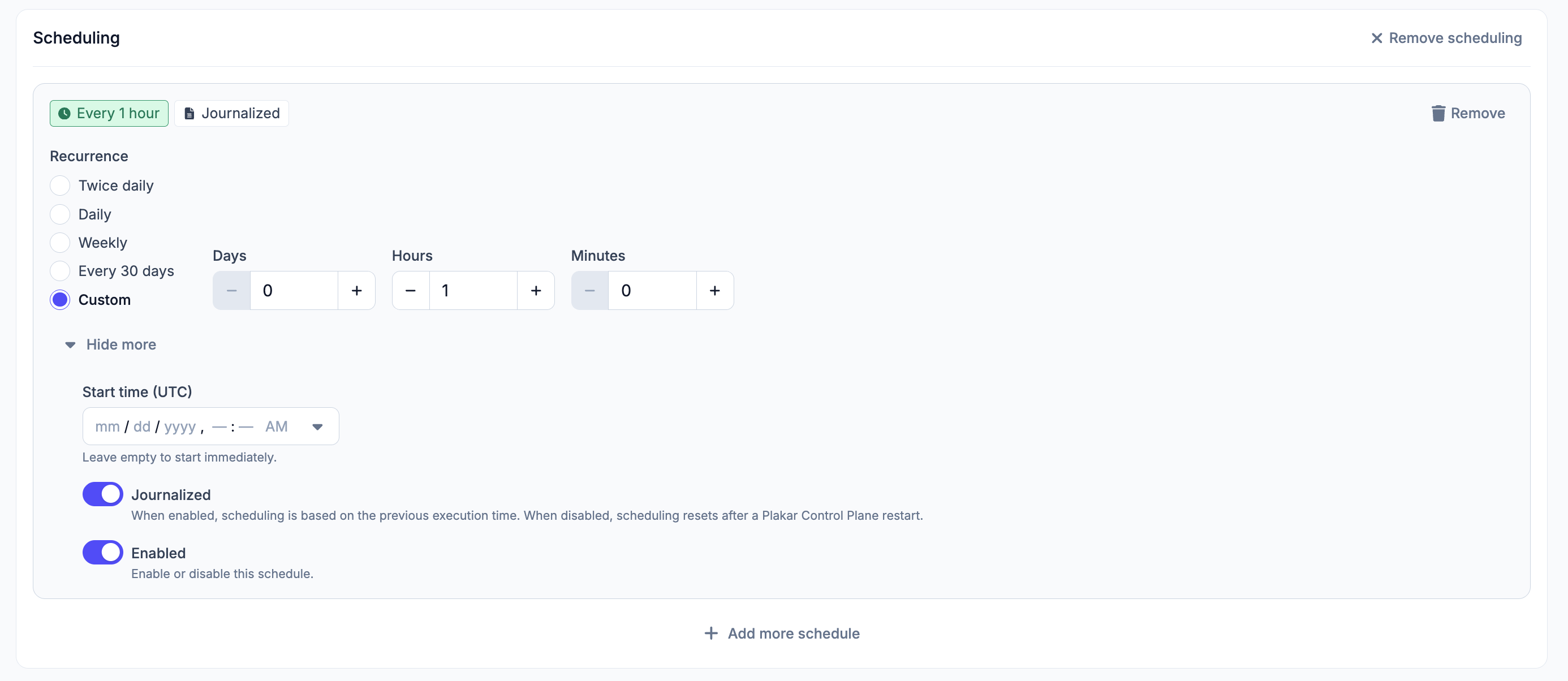
#The manual scheduler runs tasks on a recurring basis. Once a task is configured, you can attach one or more schedules to it. Each schedule is configured independently.
See the job history documentation for details on monitoring job progress, viewing job output, and finding jobs on app pages.
Recurrence
#How often the schedule runs. Available options: twice daily, daily,
weekly, every 30 days, or custom. For a custom recurrence, enter the
interval in days, hours, and/or minutes.
Start Time (UTC)
#The date and time at which the schedule first runs, specified in UTC down to the minute. If left empty, the schedule starts immediately.
Journalised
#When journalised mode is enabled, each execution is scheduled relative to the previous one. When disabled, the schedule resets its reference point after a Plakar Control Plane restart.
Enabled
#Schedules can be enabled or disabled independently. Disabling a schedule pauses that schedule without deleting it, while any other schedules attached to the task continue to run as configured.
Advanced Scheduler Settings
#Enabled
#Enables or disables the task as a whole, overriding all of its individual schedules. When disabled here, the task won’t run even if one or more of its schedules are enabled.