Organization Settings
Organization settings apply to one organization only. Every organization on the instance carries its own settings, so changing them affects that organization and the resources that belong to it, and nothing else.
Settings that apply to the appliance as a whole, and so to every organization it hosts, are Control Plane settings.
Handing settings down
A setting is not confined to the organization it is set in. Alongside its value, each setting carries a choice about what the organizations beneath it inherit:
- Not handed down, the value applies only to the organization it is set in. The organizations below it do not inherit it.
- Handed down, every organization below inherits the value, at any depth, and any of them can override it with one of its own.
- Handed down, locked, every organization below inherits the value and none of them can override it.
The choice is made per setting, so an organization can hand down its SMTP server while keeping its webhook to itself. Locking a setting lets an organization high in the hierarchy fix a value for everything beneath it, rather than setting the same value in each organization and trusting it to stay.
How an organization resolves a setting
Without a lock, an organization uses its own value for a setting. When it has none, it inherits the value of the nearest organization above it that hands the setting down, whether that is its parent or an organization several levels up. When no organization above hands the setting down, the organization has no value for it.
Only values that are handed down are inherited. The organizations beneath one that keeps a value to itself skip it and inherit from further up. If the root organization hands down an SMTP server and organization A below it sets its own without handing it down, A uses its own server and organization B below A uses the root organization’s.
A lock overrides this order. Every organization below a locked value uses it, and none of them can set its own. A value one of them set before the lock is ignored while the lock is in place, and applies again if the lock is removed.
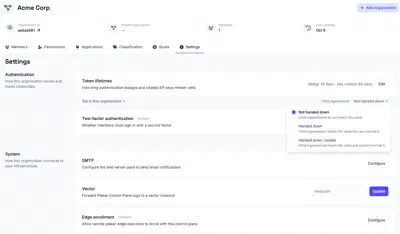
Authentication
The authentication settings control how members of this organization sign in and how long the credentials they are issued remain valid. They cover the lifetime of session badges and rotated API keys, and whether a second factor is required at sign-in.
Token lifetimes
Two time-to-live (TTL) durations are configured together here:
- Authentication badge TTL: how long an authentication badge remains valid. The badge indicates the current authentication status of a session.
- API key rotation TTL: how long an API key remains valid after its owner rotates it.
Two-factor authentication
Require the members of this organization to sign in with a second factor. Members who already hold one are unaffected. Members without one are taken through the setup the next time they sign in, and cannot reach Plakar Control Plane until a factor is enrolled. See two-factor authentication for what a member sets up and how it is used at sign-in.
System
The system settings connect the organization to the infrastructure around Plakar Control Plane. They define the mail server used for its email, an external Vector instance that receives a copy of its logs, and whether edges can enroll in it to run its tasks.
SMTP
Configure the mail server used to send email notifications for this organization, including notifications and other system-generated messages. See Email & SMTP documentation for configuration details.
Vector
Forward Plakar Control Plane logs to a Vector instance you manage. Plakar Control Plane runs its own internal Vector instance for local log processing. This setting adds the instance you provide as an additional Vector sink, so a copy of the logs is forwarded there rather than replacing local processing.
Edge enrollment
Enable edge enrollment to allow remote plakar-edge executors to register with
Plakar Control Plane. Enrollment is disabled by default. Once enabled, an
enrollment key is generated for the initial registration process, and it can be
regenerated at any time. See Edge enrollment for more
information.
This setting also decides which edges an organization can use. An organization that inherits it can run tasks on the edges of the organization that set it, in addition to its own, however many levels above that organization is. See sharing edges with child organizations.
Notifications
The notification settings send the events of the organization, such as job completions and failures, to systems outside Plakar Control Plane. Events are delivered to an external endpoint as HTTP requests through a webhook.
Webhook
Deliver Plakar Control Plane events, such as job completions and failures, to an external endpoint as HTTP requests. Webhook delivery is disabled by default. See Webhook documentation for more information.