Edge Enrollment
Before an edge can join an organization, edge enrollment must be enabled for that organization. Edge enrollment is disabled by default on Control Plane.
New edges authenticate using an enrollment key generated by the Control Plane. The key is used when an edge connects to PCP for the first time and exchanges it for an authentication token.
You work with the edges available to the organization you signed in to, and what you can do with them is determined by the permissions your application user has on the organization.
Enabling edge enrollment
To enable enrollment, open the organization’s settings and enable Edge enrollment under Organizations -> Settings. Enable it for the organization where the new edge should be registered.
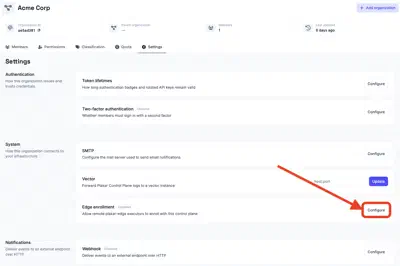
Keep enrollment enabled while you are adding edges. Once an edge has successfully enrolled, it no longer depends on the enrollment setting. PCP has issued it an authentication token, which the edge stores locally and uses for subsequent connections.
You can therefore disable edge enrollment after you have finished registering your edges. Disabling enrollment prevents new edges from joining the organization, but does not affect edges that are already enrolled.
If you need to add another edge later, enable enrollment again before starting its first connection to PCP. You can regenerate the enrollment key at any time. If you regenerate it, use the new key when enrolling subsequent edges.
Sharing edges with child organizations
An organization shares its edges with the organizations below it by handing down its edge enrollment setting. Every organization that inherits the setting, at any depth, can use the edges of the organization that set it. The setting is inherited like any other organization setting, as described in handing settings down.
A shared edge runs tasks like one of the organization’s own. It appears in the organization’s list of edges, tasks can be pinned to it, and PCP can pick it when it selects an edge for a task. Only the organization that enrolled the edge can manage it.
An organization gets edges from one organization above it at most: the one it inherits the edge enrollment setting from. For example, the root organization hands the setting down, and organization A below it sets its own and hands that down too. Organization B below A then uses A’s edges along with its own, but not the root organization’s.
The edges are shared for as long as the setting is inherited, whether or not enrollment is enabled in it. Disabling enrollment only stops new edges from joining.
An edge joins the organization that owns the enrollment key it presents. An edge enrolled with an inherited key therefore joins the organization that handed the setting down, even when it was set up for an organization below. An organization enrolls edges of its own by setting its own edge enrollment value. A locked setting prevents this, so the organizations below share the edges of the organization that locked it and cannot enroll any of their own.