Integrations
An integration gives Plakar Control Plane support for an external system. There are five kinds:
- Inventory: discovers resources from a provider, for an inventory.
- Secret provider: supplies credentials from an external secret manager, as a secret provider.
- Source: backs up a resource.
- Store: holds backups on a resource.
- Destination: restores data to a resource.
A single integration can provide several of these. Plakar Control Plane only works with systems whose integration is installed.
An installed integration is offered wherever it applies. Inventory and secret provider integrations are listed when an inventory or a secret provider is created. Source, store and destination integrations are offered when an app is set up on a compatible resource, where compatibility is decided by the class and subclass of the resource. When several installed integrations match a resource, the one an app uses is chosen when the app is set up.
Viewing, installing and upgrading integrations requires the matching permissions.
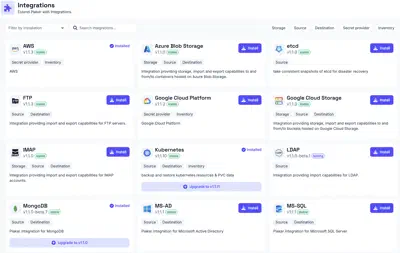
Installing an integration
Integrations are installed from the Integrations page. Inventory providers can also be installed from the Add inventory dialog, which lists providers that are not installed alongside those that are, so an inventory can be created without visiting the Integrations page first.
Updating an integration
When a newer version of an installed integration is available, its card on the Integrations page offers an Upgrade, which installs the newer version.