Configuration Bundles
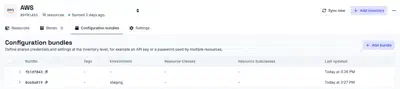
Configuration bundles are defined on an inventory and declare configuration fields, such as credentials, for the resources of that inventory. When an app is set up on one of those resources, the fields declared in the bundle are applied to it, so they do not have to be entered again for every app.
For example, an AWS inventory might discover 20 S3 buckets that all use the same
access key and secret key. A single bundle on that inventory, scoped to the
Object Storage class, declares those credentials once, and every app set up on
one of the buckets receives them.
A bundle applies only to resources of the inventory it belongs to. Bundles are managed from the Configuration bundles tab of the inventory, and what can be done with them depends on the permissions held in the organization the inventory belongs to.
Matching resources
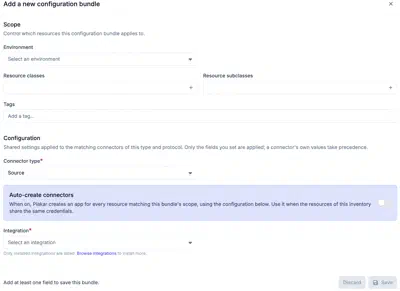
The scope of a bundle determines which resources of the inventory it applies to. Without any filter, a bundle applies to every resource. Each filter narrows the scope, and a resource must match all of them to receive the bundle:
- Environment: resources with the selected environment.
- Resource classes: resources of the selected classes, such as
DatabaseorObject Storage. - Resource subclasses: resources of the selected subclasses, such as
MySQLorS3, within the selected classes. - Tags: resources that carry the listed tags. Managed inventories discover tags from the provider. Self-managed inventories take them from the resource definition, as described in adding resources.
Bundle fields
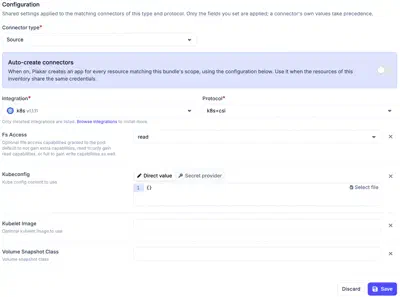
A bundle targets one kind of app, set by its Connector type: Source,
Store or Destination. It also targets one integration and, when the
integration has several, one protocol. The bundle applies to apps of that type,
integration and protocol on the resources in its scope.
The fields of a bundle are chosen from the fields of the selected integration and protocol, either one at a time or all at once. A bundle only sets the fields it contains. Every other field is left as each app defines it, and a value set on the app itself takes precedence over the bundle.
Applying a bundle to apps
When a source, store or destination app is set up on a resource in the scope of a bundle, the fields of the bundle are filled in, and the form shows which fields come from the bundle. Only the remaining fields need to be entered. If the bundle provides every required field, the app is created without further input.
A field provided by a bundle can be overridden for a single app by entering another value. The override applies only to that app. The bundle and the other apps it applies to are unaffected.

See the apps documentation for how apps are set up on resources.
Auto-creating apps
A bundle can also create apps itself. With Auto-create connectors enabled, Plakar Control Plane creates an app for every resource in the scope of the bundle, using the configuration of the bundle. Apps are only created when the bundle supplies every field the integration requires. A bundle that leaves a required field empty creates no apps, and each app has to be set up by hand.
Auto-creation suits inventories whose resources share the same credentials, where a single bundle can hold the complete configuration.