Self-Managed Inventories
A self-managed inventory is a manually maintained inventory that acts as a container for resources you define yourself. It is useful when your infrastructure is not covered by a managed inventory, such as a local MinIO instance, a self-hosted PostgreSQL database, or any other resource supported by Plakar integrations.
Creating a self-managed inventory
To create a self-managed inventory, you only need to provide a name. Once created, you can start adding resources to it. The inventory name can be edited later by clicking the settings icon in the top right of the inventory page, which opens a settings popup.

Adding resources
Resources can be added individually or imported in bulk using a CSV file.
When adding a resource manually, you need to provide:
- Name and Resource URN: Required. The name is a human-readable label to identify the resource in Plakar Control Plane. The URN is a unique and stable identifier for the resource, and cannot be changed later.
- Class and Subclass: Used to classify the resource, for example
Object Storageas the class andS3as the subclass for an S3 bucket. - Tags: tags used by policies and configuration bundles to filter resources
- Endpoint: Required. The address used to reach the resource, such as a hostname or IP address. A resource can have several endpoints.
- Exclude from backup coverage: Omits the resource from protection status and coverage reporting.
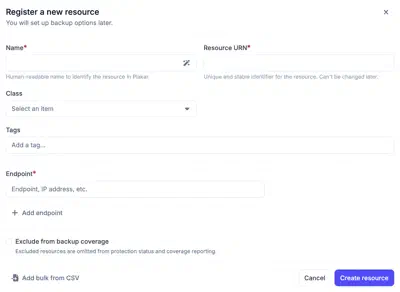
To add multiple resources at once, you can import a CSV file. Each row should represent one resource in the following format. If a resource has multiple hostnames, they can be specified by separating them with commas.
Class;Name;URN;Hostname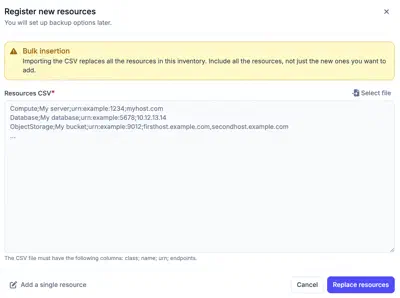
Warning
Importing a CSV file replaces all existing resources in the inventory. Make sure to include both existing and new resources in the file.