Kubernetes Inventory
The Kubernetes inventory lets Plakar Control Plane connect to a Kubernetes cluster and discover supported resources. Once connected, the discovered resources become available for management directly from Plakar Control Plane.
Supported Resources
| Resource | Source | Store | Destination |
|---|---|---|---|
| PersistentVolumeClaims (PVC) | Yes | No | Yes |
| KubeVirt virtual machines | Yes | No | Yes |
Virtual machines are discovered only when KubeVirt is installed in the cluster. On clusters without KubeVirt, the inventory discovers PVCs only.
Authentication
Kubernetes inventories authenticate using a kubeconfig file. The kubeconfig
determines which cluster Plakar Control Plane connects to and which permissions
it has, so the associated user or service account must have read access to
PersistentVolumeClaims in the namespaces you want to discover. To discover
virtual machines, it also needs read access to KubeVirt VirtualMachines in
those namespaces. See
Kubernetes Service Accounts and RBAC
for a least-privilege role.
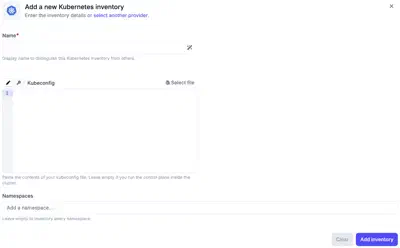
When creating an Kubernetes inventory in Plakar Control Plane, you must provide:
- Name: a name for the inventory.
- Kubeconfig: paste the contents of your kubeconfig file directly, or select your kubeconfig file to use. You can leave this field empty if Plakar Control Plane runs inside the cluster, in which case it uses the in-cluster configuration instead. The kubeconfig can also be loaded from a secret provider.
- Namespaces: namespaces to discover resources from. Leave it empty for the inventory to discover resources in every namespace in the cluster.
Creating a Kubernetes Inventory
When creating a new Kubernetes inventory, provide the inventory name and either paste in a kubeconfig or select a kubeconfig file. If Plakar Control Plane runs inside the cluster you want to inventory, you can leave the kubeconfig field empty and it will use the in-cluster configuration.
After creating the inventory, trigger a synchronization to discover and load PVCs and virtual machines from the configured cluster. You can run synchronization again at any time to refresh the inventory, for example after creating new PVCs or virtual machines.