Control Plane Settings
Control Plane settings apply to the appliance as a whole rather than to a single organization. They cover the instance identity and version, appliance networking, diagnostics, and early-access features. Settings that apply to a single organization are organization settings.
Because these settings affect every organization hosted on the instance, they require the Superuser or Platform Admin role. The Superuser is the admin account created during enrollment.
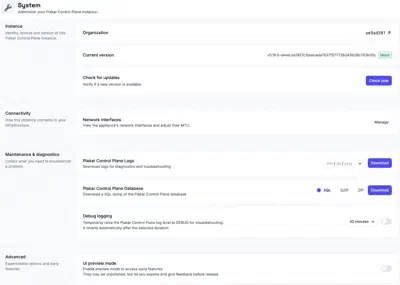
Instance
Identity, license, and version of this Plakar Control Plane instance.
Organization
Shows the identifier of the organization you are currently working in. This is the identifier used to sign in to that organization. See Signing In for how it is used.
Current version
Shows the version of Plakar Control Plane currently running, and whether it is the latest available.
Check for updates
Verify whether a newer version of Plakar Control Plane is available. See Updating Control Plane for how to install updates and, where needed, update the underlying deployment infrastructure.
System
How the instance connects to your infrastructure.
Network interfaces
View and configure the appliance’s network interfaces. The network interface table shows each interface’s name, IP address, link status, MAC address, and current MTU.
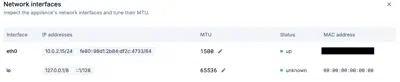
The default MTU is 1500 bytes, which is appropriate for most Ethernet networks. Increase the MTU only if every device along the network path supports the larger frame size. Using an MTU larger than the network can handle may result in packet fragmentation, dropped packets, or connectivity issues rather than improved performance. For more information about MTU values and jumbo frames, see MTU and Jumbo Frames documentation.
Maintenance and diagnostics
Everything needed to troubleshoot a problem on the instance.
Plakar Control Plane logs
Download Plakar Control Plane’s own logs for diagnostics and troubleshooting.
Pick a date and download a .log.gz file containing that day’s logs.
Plakar Control Plane database
Download a full dump of the Plakar Control Plane internal database, as SQL,
GZIP, or ZIP.
Debug logging
Temporarily raise the Plakar Control Plane log level to DEBUG to record more
detail while troubleshooting an issue. Select how long debug logging should
remain enabled before turning it on. Once the selected duration expires, Plakar
Control Plane automatically restores the previous log level.
Advanced
Experimental options and early features.
UI preview mode
Enable preview mode to access early features. They may be unpolished, but let you explore them and give feedback before release.