SLA Policies
An SLA policy defines backup requirements for your sources i.e. how often backups should be taken and how long they should be retained. When a policy is scoped to an environment and data class, Plakar Control Plane automatically creates backup schedules for all source apps that match.
flowchart TD
  subgraph Policy["SLA Policy"]
    Requirements["Frequency & retention"]
    Scope["Scope\n(environment, data class, tag)"]
    PolicyStore["Store app"]
  end

  subgraph Sources["Source Apps"]
    S1["Source A\nproduction · database"]
    S2["Source B\nproduction · critical"]
    S3["Source C\nstaging · database"]
  end

  Scope -->|"auto-match"| S1 & S2
  S1 & S2 -->|"schedule created"| Backup["Backup"]
  Requirements --> Backup
  Backup --> PolicyStore
Policies belong to a single organization. You work only with the policies of the organization you signed in to, and what you can do with them is determined by the permissions you hold there.
Creating a policy
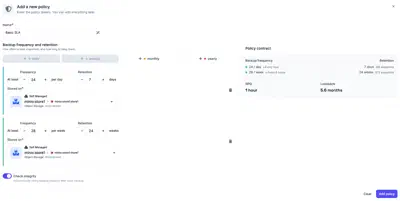
To create a policy, provide a name, then define the backup requirements and select a store app to use for backups.
Backup frequency and retention
You define requirements across six time granularities. You can configure any combination of these:
- Daily
- Weekly
- Monthly
- Yearly
For each granularity you enable, you configure:
- Frequency: how often a backup should be taken within that period, for example 4 times or once a day
- Retention: how long backup restore points should be kept
You then select a store where the backup will be stored and toggle whether you want to run a check task on the after each. It’s recommended to leave this on.
Policy summary
Before creating the policy, Plakar Control Plane shows you a summary of the policy contract based on your selections.
The summary shows the RPO and lookback derived from your settings. RPO is the maximum data loss window based on your most frequent backup, and lookback is how far back you can restore from based on your retention settings.
Scoping a policy
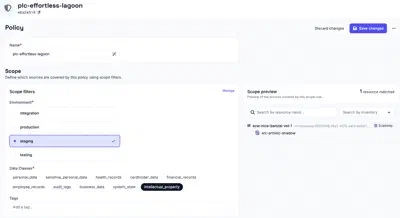
After creating a policy, you are immediately taken to the scoping page to set up the environment and data class filters.
Supported scope filters include:
- Environment: the environment the policy applies to. Environments are managed from the organization’s classification settings.
- Data Class: one or more data classes the policy applies to. Data classes are managed from the organization’s classification settings.
- Tag: narrows the matched sources down further to only those carrying the specified tag. Useful when environment and data class alone would match more sources than intended.
Plakar Control Plane matches all source apps against the configured scope. Any source app whose environment and data class match the policy is automatically scheduled according to the policy rules. When a new source app is added with matching values, it is automatically picked up by the policy without any additional configuration.
Scope is not the only condition. A policy also respects data residency: a matched source is only scheduled when it and the policy’s store share the same residency.
A source app can be covered by multiple policies if their scopes overlap. This allows policies to be layered for example, a general policy covering all production sources and a stricter policy specifically covering production databases.
Scheduling
Once a policy is scoped, the policy scheduler automatically creates backup schedules for all matching sources using the store app selected when the policy was created. See the policy scheduler documentation for more details.
Managing environments & data classes
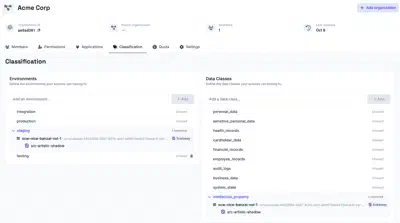
Environments and data classes used by the SLA system to scope resources are managed per organization, from Organization -> Classification. From there, you can create new environments and data classes, or delete existing ones.
Because they belong to an organization, the environments and data classes available to a policy are the ones defined in the organization that policy lives in. See Managing Organizations for more information about how organizations isolate configuration.