Application Users
Application users authenticate to the Plakar Control Plane API using API keys instead of interactive credentials. They are intended for automation and integrations, such as the Plakar Kubernetes Operator, the Terraform provider, the Ansible collection, or custom applications that interact with the API.
Creating an application user
To create an application user, select Application as the user type, then provide a name for the application user and the organization it belongs to. API requests made with the application’s keys operate within that organization. Once you create an application user, you can immediately generate an API key to authenticate API requests.
An application user with no role assigned can authenticate with its API key but cannot do anything with it. See permissions for the roles that can be assigned.
API keys
Each application user can have multiple API keys, allowing different services or deployments to use separate credentials.
To create an API key, open the application’s API key dialog, optionally provide a description, then generate the key. The generated key is used to authenticate API requests on behalf of the application user.
The API key management dialog also lists all existing API keys for the application, allowing you to review and delete keys that are no longer needed.
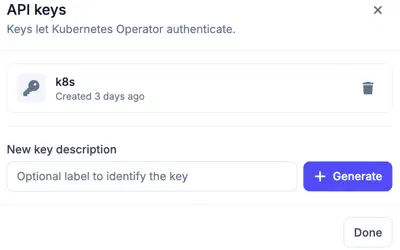
API keys
API keys are displayed only once when they are created. After you leave this page, the key cannot be viewed again. Store it securely in a password manager, secrets manager, or another secure location before continuing.
Rotating an API key
An application rotates its own key by calling
POST /api/v1/account/api-keys/rotate with that key, as described in the
API reference. The
response returns the new key, which remains valid for the
API key rotation TTL of the
organization.
The old key keeps working for 24 hours by default, so processes still using it
can switch to the new one without interruption. The response reports when it
stops in predecessor_expires_at. To end the old key at once, for example when
it has leaked, set revoke_immediately to true in the request.
Revoking an API key
Deleting a key in the API key dialog revokes it. It stops working on the next request, even for a session that signed in with it before the key was deleted.